
Products/Wishio - wishlist addon for WooCommerce
The wishlist plugin every WooCommerce store should have
Wishio is a wishlist plugin for WooCommerce. Shoppers save products with one tap, guests included, and you see what they want, then bring them back with price-drop and back-in-stock emails.
Made forWooCommerce
About Wishio
What is Wishio for WooCommerce?
A wishlist plugin that lets shoppers save products, including specific variations, and come back to them later. Start free, then upgrade when you want to turn saved items into sales.
Wishio Free
Everything to start collecting wishes
Heart button, guest wishlists, the My Account wishlist tab and a demand dashboard.
Wishio Pro Adds
Turn saved items into sales
Price-drop and back-in-stock emails, multiple and shareable lists, sales attribution, FluentCRM and Mailchimp integrations, and AI tools over MCP.
Why Wishio
Shoppers save, then forget. You lose the sale.
Most shoppers do not buy on the first visit. Wishio turns that lost intent into a demand signal you can act on.
Intent
Most wishlist plugins stop at saved items.
A plain wishlist remembers favourites, but it does not tell owners what to do next. Wishio closes the loop with alerts, opportunities, and revenue reporting.
Demand
Winter Jacket saved by 84 shoppers
Out of stock and waiting for a restock alert
Restock
Cotton Hoodie saved by 61 shoppers
Price unchanged for 45 days
Discount
Running Shoe saved by 39 shoppers
Saved 3 weeks ago with no return visit
Re-engage
Features
A wishlist that works for shoppers and store owners
One-tap save everywhere
A heart button on product pages, shop grids and related products, plus a shortcode, a block and Elementor support for anywhere else.
Guests count too
Guests save without an account and get their own wishlist page. Their list moves into their account when they log in or register.
Multiple and shareable lists
With Pro, logged-in shoppers keep named lists and share a read-only link by copy, social or email.
Visual designer
Pick the icon, size, position and colours, edit the popup wording, or inherit your theme. No CSS needed.
Automatic alerts
Pro sends price-drop, back-in-stock, item-added and reminder emails, grouped so each shopper gets one message.
Dashboard and attribution
Free shows top saved products, demand and engagement. Pro adds the revenue wishlists drive and the alerts that converted.
Works with every product type
Simple and variable products. Each variation is saved with its price and stock status, so a shopper who saves a size or colour hears about that exact one.
Place it anywhere
A floating button, a header wishlist count, the Wishlist Button block, Elementor, and shortcodes for anywhere else.
Your data stays on your site
Wishlists are saved in your own WordPress database. Guest lists clear automatically after 30 days unverified or 395 days verified, adjustable in Pro. HPOS compatible.
FluentCRM and Mailchimp
With Pro, FluentCRM automations start when an item is added, drops in price, comes back in stock or is bought, and smartcodes put saved items in your emails. Wishlist events also go to Mailchimp, and you can add wishlist customers to a list.
AI tools over MCP
With Pro, connect an AI assistant and ask about top items, product demand, opportunities and attribution. It can only send an alert or clear data after you preview and confirm.
Guest reward coupons
With Pro, give guests a WooCommerce coupon when they leave or verify their email. Set the code prefix, expiry, whether it covers their saved items, and who qualifies.
Everything Wishio does
A wishlist that sells, not just saves
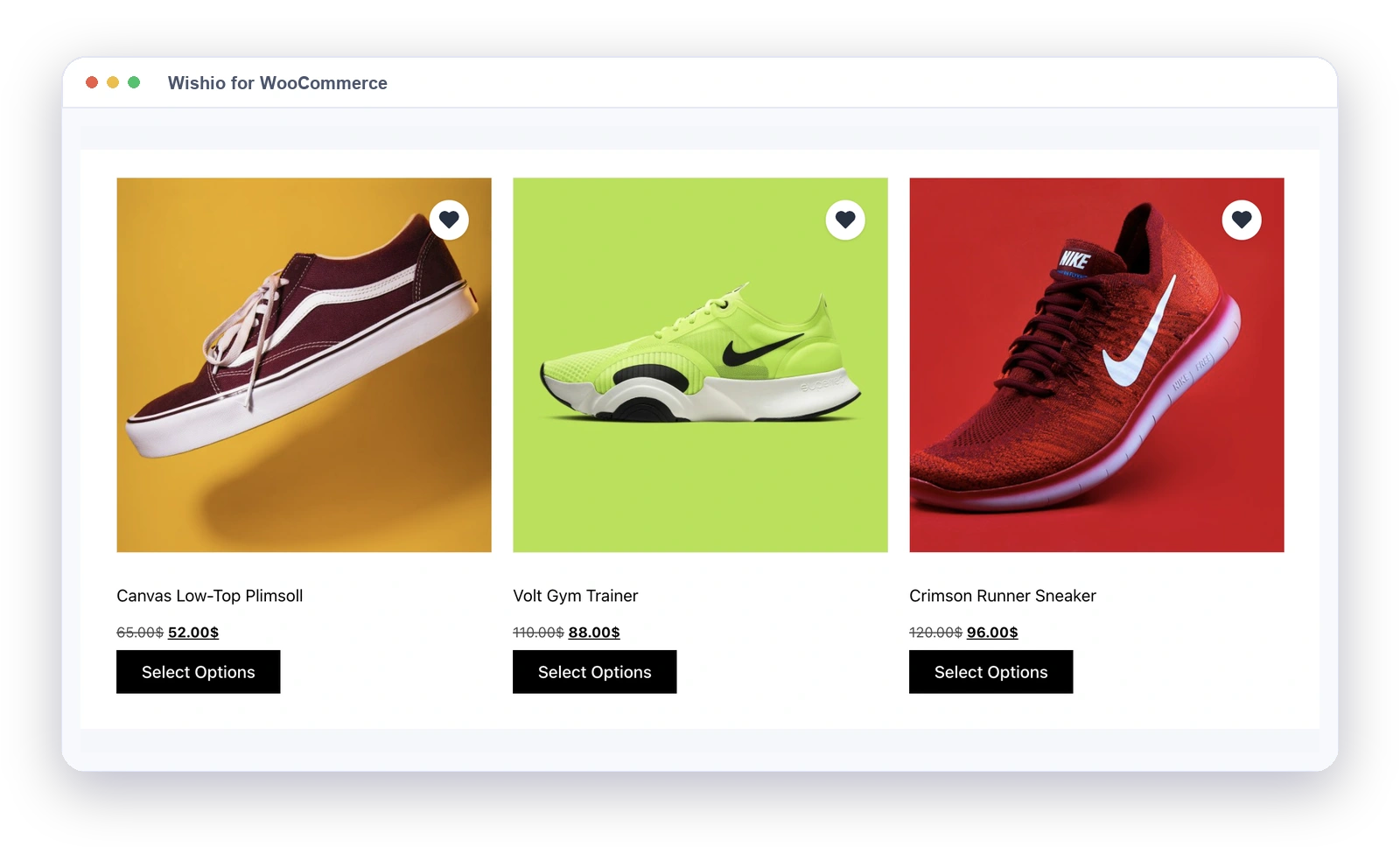
A heart button everywhere shoppers browse
One tap to save from product pages, shop grids, category pages and related products. Put the button anywhere else with a shortcode, a block or Elementor.
- Product pages and shop grids
- Category pages and related products
- Shortcode, block and Elementor placement
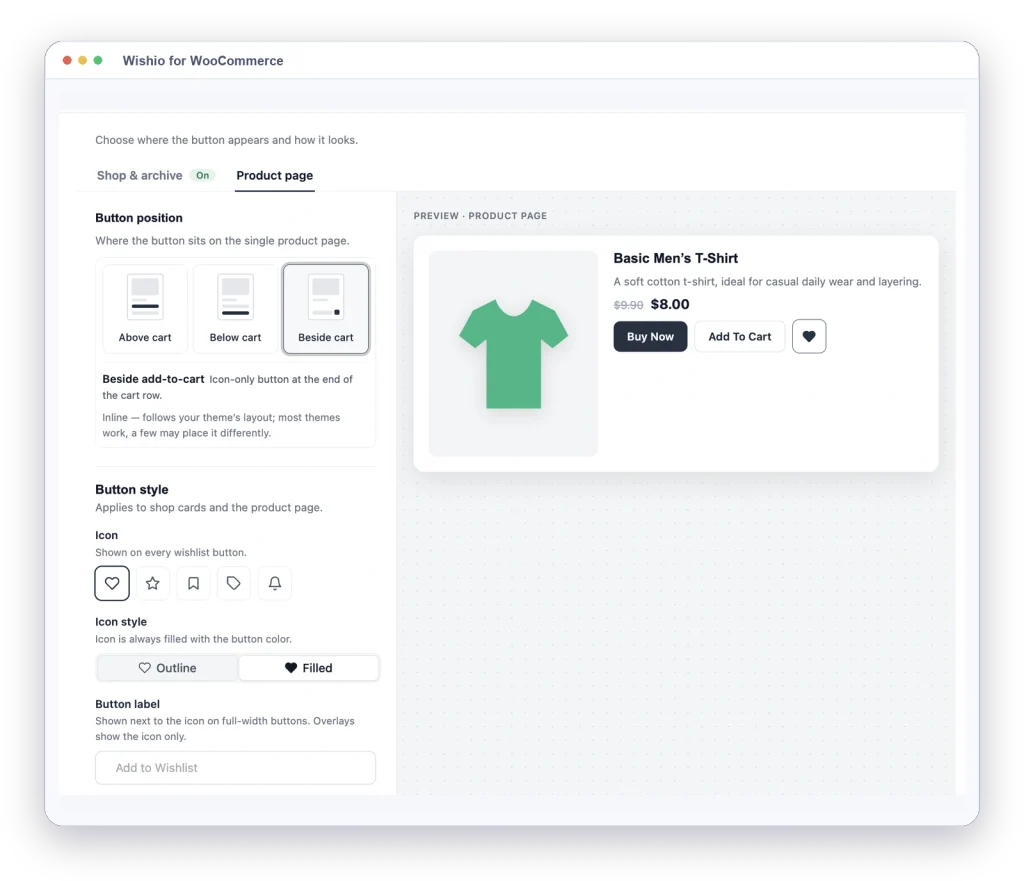
Match the wishlist to your store
Choose the icon (heart, star, bookmark, tag or bell), style, size, position and colours. Edit the wording and colours of the email, verification and login popups, or inherit your theme.
- Button positions and colours
- Popup and panel styling
- Inherit theme styles
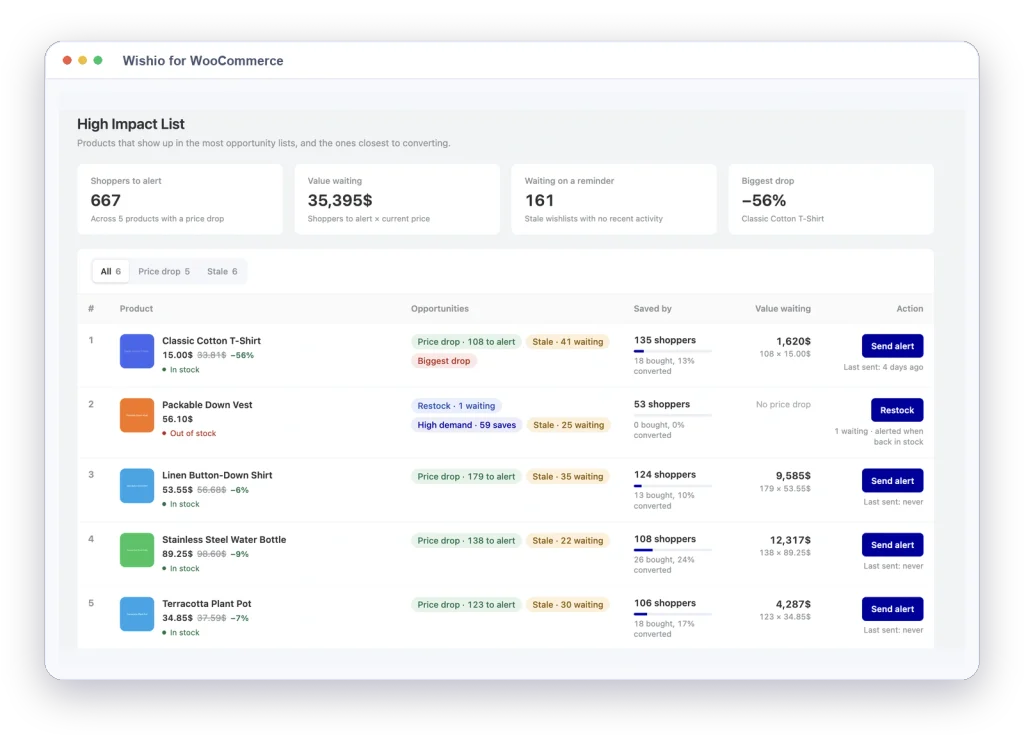
Bring shoppers back at the right moment
Wishio Pro emails shoppers when a saved product drops in price or comes back in stock, confirms new saves, and reminds them about lists left alone. Emails go out in the background, one per shopper.
- Price-drop emails
- Back-in-stock alerts
- Stale wishlist reminders
See what your wishlist earned
The Wishio dashboard goes past saved-item counts: revenue from wishlists, alert emails, direct purchases, top products, and top customers.
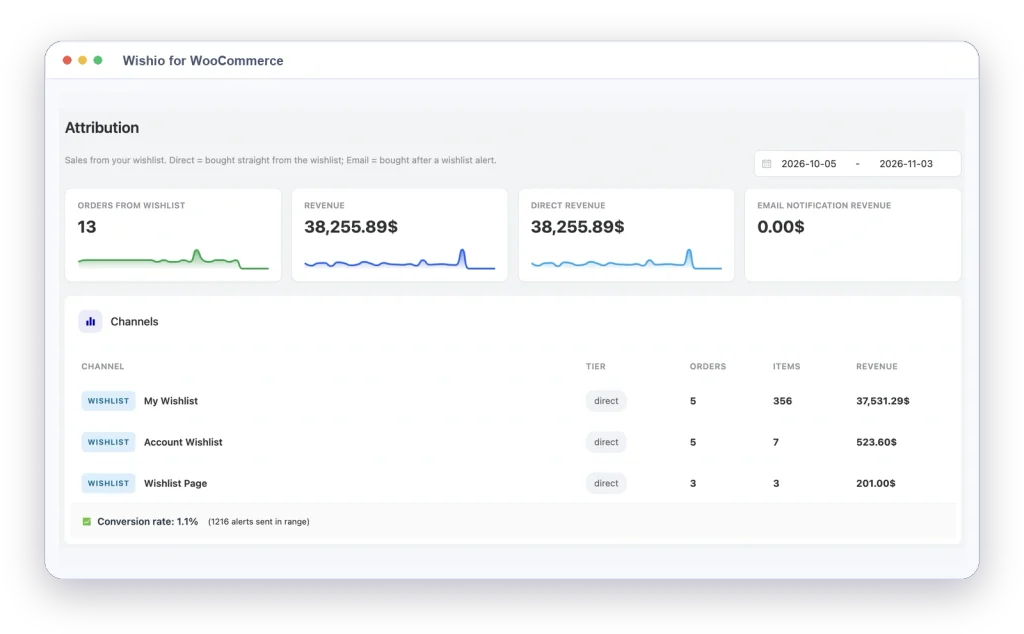
- Wishlist revenue attribution
- Top products and customers
- Opportunity list for owners
Ask your AI what needs restocking
Connect an AI assistant over MCP and ask about top items, product demand, opportunities and attribution. Anything that changes data, like sending an alert, needs a preview and your confirmation first.
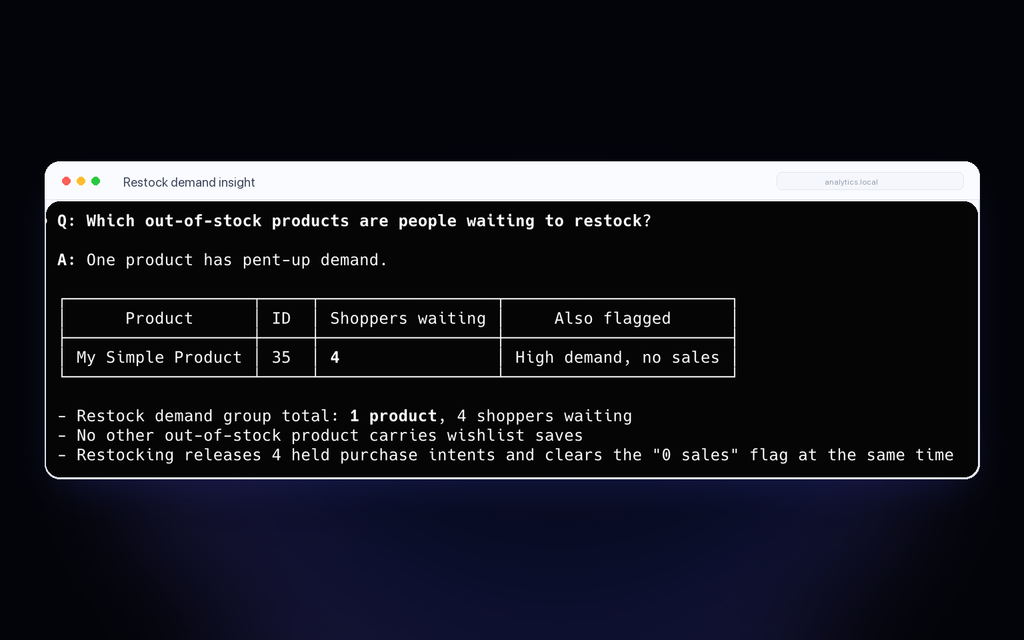
- Demand and attribution answers
- Alerts sent only after you confirm
- Off until you switch it on
WORKS WITH
Connects to the tools you already run
Wishio reads WooCommerce products, variations, prices and stock. Pro sends wishlist activity to FluentCRM and Mailchimp, and lets your AI assistant answer questions over MCP.
WooCommerce
Products, variations, prices and stock
STORE DATA
FluentCRM
Segment shoppers by saved intent
AUTOMATION & TAGGING
Mailchimp
Send wishlist events, add shoppers to a list
EMAIL MARKETING
MCP
Ask which products need restock
ASK YOUR AI
How it works
How does Wishio for WooCommerce work?
Four steps from a saved product to a sale. No theme edits, no developer required.
1
Shopper saves
A shopper taps the heart on a product page, shop grid or related product. Guests can save too.
2
Wishio remembers
Wishio stores the product, the exact variation, and its price and stock status at the moment of saving.
3
Owner sees demand
The dashboard and product editor show what people want, what is out of stock and which saves have gone quiet.
4
Alerts drive sales
With Pro, price-drop and back-in-stock emails bring shoppers back, and the sale is credited to the wishlist.
Problems it fixes
What Wishio will solve
Eight situations WooCommerce stores hit today, and the mechanism Wishio uses for each. Everything here ships in the product — the free tier captures the demand, Pro acts on it.
Apparel and limited-run goods
The out-of-stock walk-away
Without Wishio
Out-of-stock demand is invisible. Restocking runs on guesswork while interested shoppers drift to whoever had stock that day.
With Wishio
- One-click save on an out-of-stock item, with a stock snapshot at save time
- Batched back-in-stock alerts — one email per shopper, not one per restock
- Opportunities report ranks which out-of-stock products hold the most saved demand
Electronics and higher-ticket goods
The price-watcher who never comes back
Without Wishio
Price-sensitive intent goes unrecorded, so every promotion is a blunt, margin-eroding blast to everyone.
With Wishio
- Price captured at save time, per shopper
- Price-drop alerts showing the old price struck through and the new one
- A price-drop-ready list: the exact products where a small move converts saved demand
Impulse and gift purchases
The guest who will not make an account
Without Wishio
Guest intent evaporates: no email, no list, no way to reconnect once the tab closes.
With Wishio
- Durable guest wishlists on a secure cookie session with a local mirror
- Email-to-save prompts, styled in the designer; one-time-code verification (Pro) when you need verified contacts
- Guest lists merge into the account automatically on login or registration
Inventory-heavy stores
Flying blind on what to restock and reprice
Without Wishio
Merchandising runs on intuition. Reports show what sold, never what people wanted and could not get.
With Wishio
- Captured demand, wishlist value and most-wishlisted products in the Wishio dashboard
- Per-product demand widget right in the product editor
- Opportunities report ranks restock, repricing, stale saves, and guest recovery by impact
Marketing-led stores
Running alerts but cannot prove the ROI
Without Wishio
Email effort is unmeasured — no way to separate revenue an alert caused from revenue that was coming anyway.
With Wishio
- Purchase attribution ties paid orders to the item and channel, reversing on refunds
- Attribution report splits direct wishlist revenue from alert-influenced revenue
- The free overview shows saves, demand and engagement; Pro adds the revenue numbers
Giftable and registry-style goods
The gift list, and word of mouth left on the table
Without Wishio
Lists stay locked to one device. Your own customers cannot market you to the people most likely to buy for them.
With Wishio
- Public lists shared by private token link
- Clean read-only shared page, no login required
- Copy-link, social and email sharing built in (Pro)
Stores running FluentCRM
Nurture that ignores what people saved
Without Wishio
Wishlist activity and the CRM live in separate worlds; high-intent moments pass with no automated response.
With Wishio
- FluentCRM funnel triggers on item added, price drop, back in stock, and purchased
- Wishlist smartcodes: saved items, counts, total value, and the shopper's list link
- Scheduled reminder emails that re-surface saved items, with an unsubscribe path
Agencies and multi-store operators
The same wishlist on every client store
Without Wishio
Either no wishlist, or a generic plugin per site that knows nothing about WooCommerce's reports, CRM, or data model.
With Wishio
- One add-on across every store, licensed per site: 1-site, 5-site and 15-site plans
- Works with WooCommerce out of the box, with zero core changes: no per-site custom integration
- Wishlist data over MCP for AI-assisted questions, with confirmation before any change
Pricing
One plan unlocks everything
Every Pro plan includes every Pro feature. The only choice is site count and term.
Waitlist
Wishio Pro opens soon
Checkout isn't open yet. Leave your email and we'll write once, the day Pro plans go on sale.
Launch −20% Launch pricing on every plan until Dec 3
Solo / Blogger
For your own store
Regular price $59 Launch price $47 / first year
Renews at $59/year
1 site
Recommended
Small Business
For teams running a few stores
Regular price $119 Launch price $95 / first year
Renews at $119/year
5 sites $19.00 per site
Agency
For agencies managing client stores
Regular price $229 Launch price $183 / first year
Renews at $229/year
15 sites
Solo / Blogger
For your own store
Regular price $149 Launch price $119 / one-time
Pay once, no renewal
1 site
Recommended
Small Business
For teams running a few stores
Regular price $299 Launch price $239 / one-time
Pay once, no renewal
5 sites $47.80 per site
Agency
For agencies managing client stores
Regular price $599 Launch price $479 / one-time
Pay once, no renewal
15 sites
Included in every plan
- All wishlist and sharing features
- Price drop and back-in-stock emails
- Multiple lists and revenue attribution
- FluentCRM and Mailchimp integrations
- Automatic updates and Pro support
14-Day Money-Back Guarantee
Try Wishio Pro risk-free. If it is not the right fit, we will refund your purchase.
- Full refund, not store credit
- No questions asked
- Processed within 24 hours
Free vs Pro
Compare the editions
| FEATURE / CAPABILITY | FREE | PRO |
|---|---|---|
| Save products and individual variations | ||
| Guest wishlists, merged into the account on login | ||
| Guest save limit with email capture | ||
| Heart button on shop, product and related products | ||
| Shortcodes, Gutenberg block and Elementor support | ||
| Header wishlist count | ||
| Button and popup design settings | ||
| My Account wishlist tab with add to cart and CSV export | ||
| Demand dashboard, products-list column and product editor demand box | ||
| Multiple named lists per shopper | ||
| Shareable read-only wishlist links | ||
| Guest email verification by one-time code, or login to save | ||
| Custom guest data retention | ||
| Price-drop, back-in-stock, item-added and reminder emails | ||
| Guest reward coupons | ||
| Sales attribution, revenue reports and CSV export | ||
| Opportunities: restock, price-drop and re-engage actions | ||
| FluentCRM triggers, goals and smartcodes | ||
| Mailchimp list sync | ||
| AI tools over MCP | ||
| Automatic updates and Pro support |
Make saved products sell
Add a wishlist to your store, recover lost intent with alerts, and see the revenue your wishlist drives.
Wishio for WooCommerce
The free version covers the core wishlist: heart button, guest lists, shareable pages, and the admin table.
- Wishlist button
- Shareable pages
- Admin table
- Top-items report
INCLUDED IN THE FREE VERSION