Cloud Storage Manager
for Fluent Forms
Automatically offload Fluent Forms file uploads to cloud storage, organize them into dynamic folders, and keep your WordPress server clean, fast, and scalable.
Supported cloud services
 Google Drive
 Dropbox
 Amazon S3
 Cloudflare R2
 OneDrive
Made forFluent Forms
WHO IT IS FOR
Built for any site collecting files through Fluent Forms
Agencies collecting client files
HR teams collecting resumes
Schools collecting submissions
Membership sites handling uploads
SaaS onboarding forms
Online exams collecting answer sheets
Legal teams collecting case documents
Real estate firms gathering property files
Event organizers receiving registrations
Healthcare clinics collecting patient forms
Freelancers receiving project assets
Any site using Fluent Forms uploads
FEATURES
Everything the plugin handles for you
From upload to organization, it works inside the forms you already run.
Integrate with native image and input field
Integrate any supported cloud service and manage uploads using your current form fields - no new inputs to create.
Flexible folder naming for effortless organization
Easily name and organize folders your way to keep uploads structured and your workflow efficient.
Fast, smooth submissions with background uploads
Files upload quietly in the background, allowing instant form submission and a seamless user experience.
Full compatibility with Fluent Forms integrations
Supports all Fluent Forms integrations with seamless compatibility across tools, workflows, and automations.
Built-in file explorer and analytics
Access, organize, and manage your uploaded files directly inside Fluent Forms with the integrated file explorer.
Multiple cloud storage services
Choose from popular cloud platforms such as Google Drive, Dropbox, or Amazon S3, and connect the one that fits your needs.
Supported storage services
Connect the platform your team already uses
FREE TIER
Google Drive
Google Drive makes file storage and collaboration effortless. Access your files anywhere and work seamlessly with Google Workspace.
FREE TIER
Dropbox
Dropbox keeps your files organized and synced. Share, collaborate, and access your files from any device.
PRO
Amazon S3
Store, manage, and access large files securely with Amazon S3's scalable cloud storage.
PRO
Cloudflare R2
Cloudflare R2 offers fast, cost-effective object storage. Store, manage, and deliver files efficiently with zero egress fees.
PRO
Microsoft OneDrive
Securely store, sync, and access personal or work files across devices with Microsoft OneDrive.
UPCOMING
pCloud
Secure storage with fast syncing, file versioning, and client-side encryption. Arriving this year — see the roadmap.
INSIDE THE PLUGIN
Simplified process, effortless management
Experience the simplicity and efficiency you have been searching for, all within one dynamic solution.
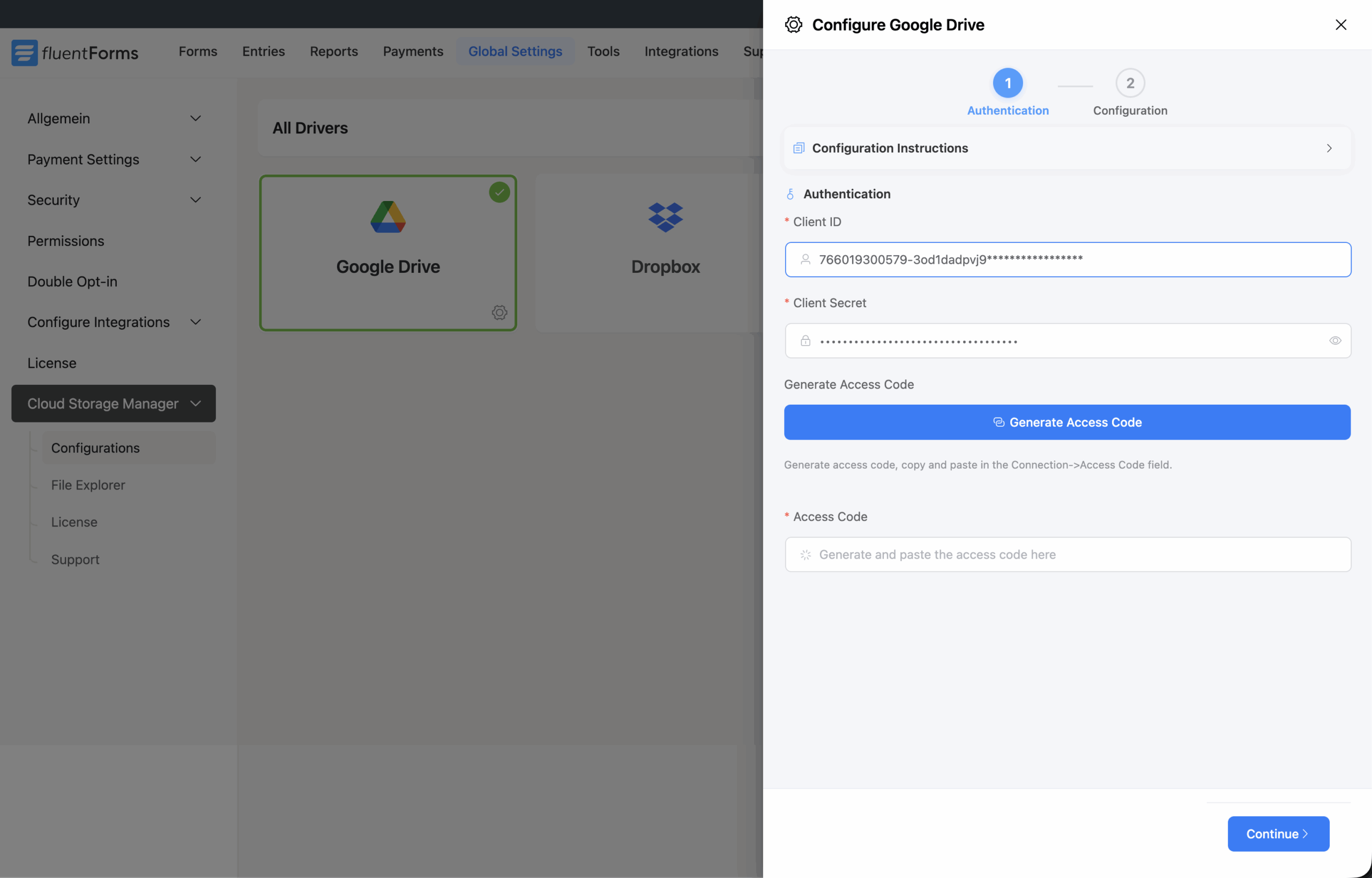
Easy connection interface
Connect your preferred storage driver in just a few clicks
Enter your driver credentials in the connection settings, generate the access code, pick the parent folder, and the connection is done.
Direct browser to cloud upload
Files go straight to your cloud, never through your server
Uploads travel from the visitor's browser to your connected storage directly, so large files never occupy your hosting disk or count against its upload limits.
Your server stays out of the transfer path, which keeps submissions fast and your WordPress install light.
Dynamic folder naming
Organize uploaded files more efficiently
Automatically store user-uploaded files in custom folders using values like user country, name, email address, or form submission ID.
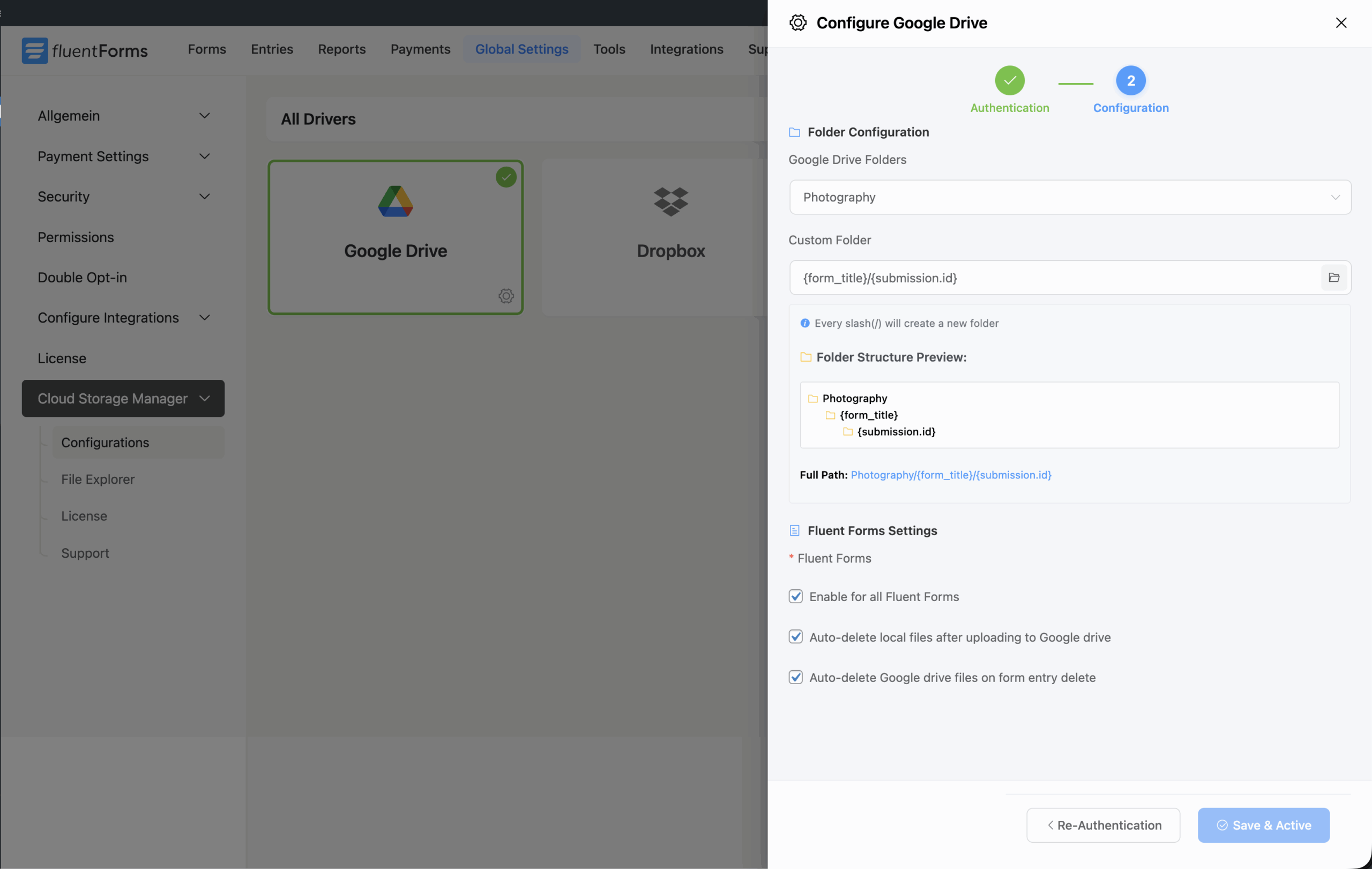
Conditional sub-folder
Upload and organize files with conditional logic
Set conditions that route files to different folders using gender, country, age range, or any other form field value.
Full AND/OR condition groups give you rules that match your workflow.
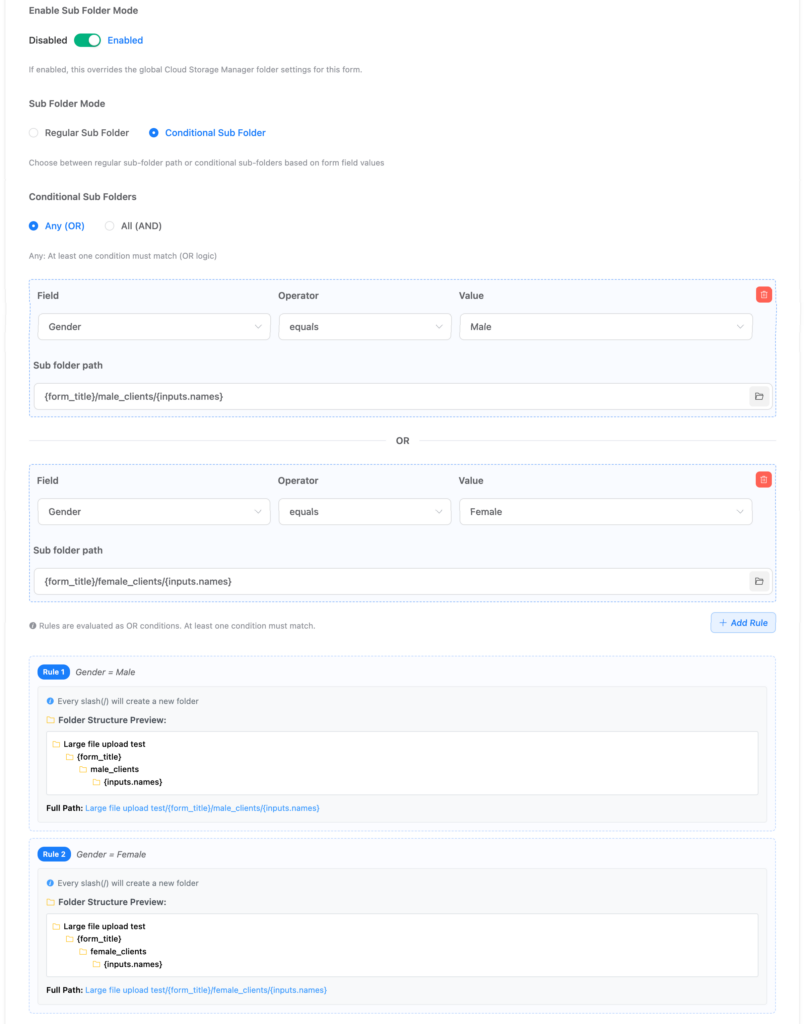
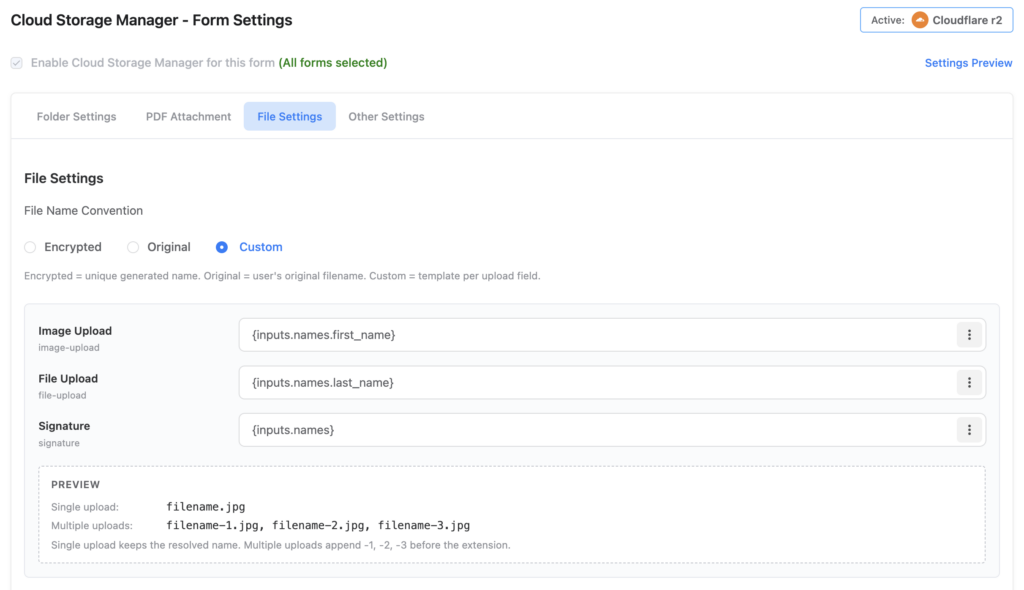
Custom file naming
Custom file naming using SmartCodes
Rename uploaded files with Fluent Forms SmartCodes like {inputs.names.first_name} so names carry the submitter, not the upload.
my_new_cv.pdf becomes john_cv.pdf, signature.png becomes john_signature.png.
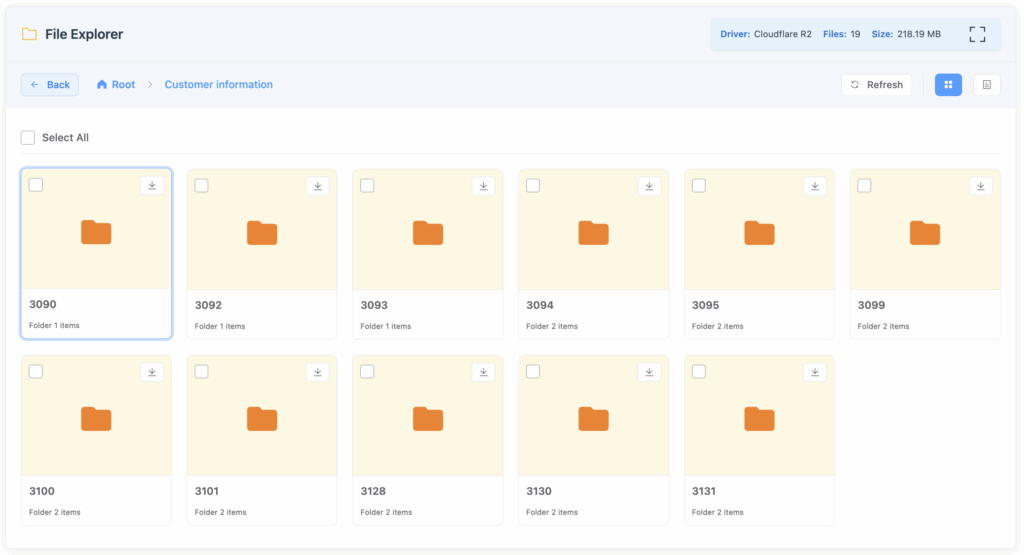
Modern file explorer
Manage files directly inside WordPress
Browse and download uploaded files straight from your WordPress dashboard, without opening your cloud provider.
One place for stored files, submitted documents, and user uploads.
How it works
Live in four steps
Get up and running with Cloud Storage Manager in just a few simple steps
1
Install & activate
Install the plugin through WordPress and activate it from your plugins dashboard.
2
Connect services
Set up your cloud storage account credentials and authorize the connections.
3
Configure forms
Select which forms should use cloud storage and customize your folder organization.
4
Start uploading
Files uploaded through your forms are automatically sent to your cloud storage.
300+
Active installs
5.0
WordPress.org rating
Listed
Official Fluent Forms partner
OFFICIAL INTEGRATION
An official Fluent Forms–listed integration
Cloud storage was one of the most requested Fluent Forms features. This plugin gives teams a straightforward Google Drive route and a scalable S3 option in one place.
PRICING
Every feature, whichever plan you pick
Full access, zero restrictions. The only choice is site count and term.
Solo/Blogger
$39 / yearly
1 site license
All cloud storage providers
Custom folder naming with shortcodes
Full file manager control
Advanced storage insights
Free customer support
Small Business
$79 / yearly
5 site license
All cloud storage providers
Custom folder naming with shortcodes
Full file manager control
Advanced storage insights
Free customer support
Agency License
$179 / yearly
Unlimited sites
All cloud storage providers
Custom folder naming with shortcodes
Full file manager control
Advanced storage insights
Free customer support
Solo/Blogger
$99 / lifetime
1 site license
All cloud storage providers
Custom folder naming with shortcodes
Full file manager control
Advanced storage insights
Free customer support
Small Business
$199 / lifetime
5 site license
All cloud storage providers
Custom folder naming with shortcodes
Full file manager control
Advanced storage insights
Free customer support
Agency License
$299 / lifetime
Unlimited sites
All cloud storage providers
Custom folder naming with shortcodes
Full file manager control
Advanced storage insights
Free customer support
14-Day Money-Back Guarantee
Try Cloud Storage Manager Pro risk-free. If it is not the right fit, we will refund your purchase.
Full refund, not store credit
No questions asked
Processed within 24 hours
FREE VS PRO
What the Pro edition unlocks
| Feature | Free | Pro |
|---|---|---|
| Supported cloud services | Google Drive & Dropbox | All available and upcoming drivers |
| Direct browser-to-cloud upload | No | Yes |
| Custom folder naming with shortcodes | No | Yes |
| Advanced file manager | No | Yes |
| Storage reports & insights | No | Yes |
| Auto-delete local files after upload | Yes | Yes |
| Auto-delete cloud files on entry delete | Yes | Yes |
| Form-specific parent folder path | Yes | Yes |
| File visibility control — Drive & Dropbox | Yes | Yes |
| File expiration — OneDrive, S3 & R2 | No | Yes |
| Upload form entry as PDF attachment | No | Yes |
| Per-form conditional folder paths | No | Yes |
FAQ
Before you install.
What is next
On the development pipeline
pCloud
Secure cloud storage with fast syncing, file versioning, and client-side encryption options.
Google Workspace shared drives
Connect Cloud Storage Manager to your GWS shared drive for more dynamic file management.
Client-facing file manager
Let your clients log in to your website and access the files they have uploaded.
Ready to streamline your file management?
Connect Fluent Forms to the cloud storage your team already uses and stop filling your server with uploads.
FREE VERSION
Cloud Storage Manager for Fluent Forms
Send Fluent Forms uploads straight to your cloud, bypassing default storage for faster, cleaner file handling.
- Google Drive
- Dropbox
- Amazon S3
- Cloudflare R2
- OneDrive
SUPPORTED CLOUD SERVICES