PLUGIN EXTENSIONS & CUSTOM FEATURES
Post to inbox: one checkbox that sends every post as a campaign
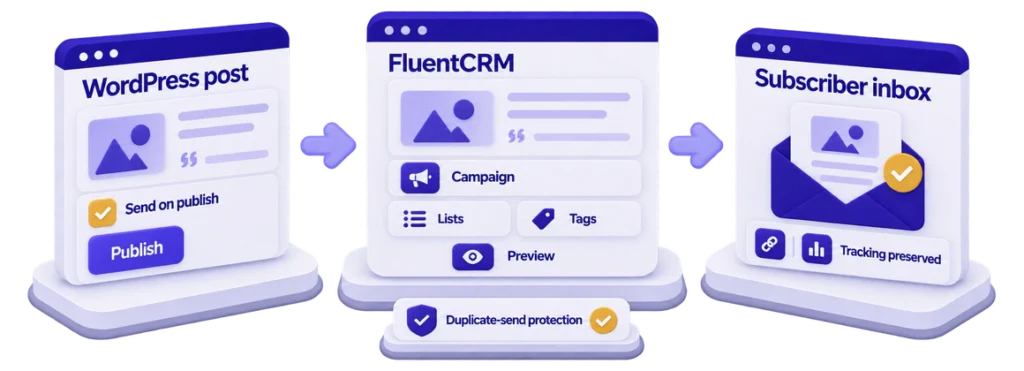
One checkbox in the post editor. The hard part was making FluentCRM treat a campaign created by code exactly like one it created itself — same pipeline, same tracking, same editor.
9
modules, one job each
2,755
line class replaced
3
send guards
0
custom tables





| Client | An independent author and journalist publishing long-form posts from WordPress to an email list (anonymised) |
|---|---|
| Challenge | Every post meant a second job: rebuild it as a FluentCRM campaign by hand. An earlier automation attempt — one 2,755-line class — created campaigns that did not reliably go out, so the client checked FluentCRM after every publish. |
| Delivery | An editor sidebar (enable, subject, preheader, lists and tags, preview, test send, send now), a send engine with idempotency and recursion guards, an email-safe renderer, a settings screen with campaign history and system status, the FluentCRM list and tag setup, and handover. |
| Stack | WordPress, PHP, FluentCRM, FluentSMTP, JavaScript |
| Timeline | About one week in September 2025, version 2.3.0 |
The challenge
The client writes long posts — captioned images, pull quotes, the occasional table — and wanted every post in subscribers’ inboxes the moment it went live. FluentCRM already held the list. What was missing was the bridge: before this build, each post meant a second job after the writing was done. Open FluentCRM, start a campaign, paste the post, put the featured image back, fix the captions and image paths that did not survive the paste, pick the lists, write a subject, send. An earlier automation attempt existed — one 2,755-line class — and it created campaigns that FluentCRM did not reliably send, so the client had learned to check the CRM after every publish, which defeated the point.
The requirements were plain: publishing a post sends it, with per-post control in the editor — on or off, subject, preheader, lists and tags; the email carries the post as written, with FluentCRM’s unsubscribe link and tracking intact; a preview and a test send before publishing, and a manual send for posts already live; never send twice, always send to someone; what happened visible where the client already is; and FluentCRM stays the source of truth — no parallel queue, no custom tables.
The hard part: FluentCRM’s campaign pipeline is built for its own admin interface, with no public “send this now” call for third-party code. Getting a campaign out of the door means matching four implementation details exactly — the status its scheduler looks for, the shape of its recipient settings, the way its background processor is kicked, and the order in which the block editor saves a post versus the sidebar fields attached to it. Miss any one and the failure is silent: a draft sits there, or a campaign archives itself with zero recipients an hour later, and nothing errors.
What ScalarWP built
ScalarWP started by proving the send in isolation: one hook, one hardcoded list, about 150 lines, committed on its own — because debugging the send inside a 2,755-line class had hidden which step was failing. Reading FluentCRM’s scheduler explained the earlier failures. Its tick only picks up campaigns in two statuses, and “scheduled” — the status the old code set — is one FluentCRM’s own interface merely passes through; worse, housekeeping archives a scheduled campaign with no pending emails. And the old code wrote recipients as parallel list and tag arrays, when FluentCRM holds them as {list, tag} pairs — so segmentation found nothing it could read and failed closed to zero subscribers. The fix was to stop guessing and copy what FluentCRM’s controller does when someone clicks Send.
The send engine now runs on the ordinary save of a published post — not the publish transition, which fires before the block editor’s separate meta-box request delivers the sidebar fields and so reads a configuration that is not there yet. Config saves at one priority, the send runs at the next, and the condition is “published and not yet sent”, made safe by a sent marker on the post. Each send detaches its own hook against recursion, creates a draft campaign through FluentCRM’s Campaign model, renders through FluentCRM’s classic design template filter so smartcodes, click tracking and unsubscribe behave exactly as in hand-built campaigns, emits one {list, tag} pair per selection — falling back to the main list rather than sending to nobody — sets the campaign processing, fires the processor’s own non-blocking trigger, and writes back the campaign ID and a recipient count read from the campaign’s own rows. Any exception lands on the post as a failed send the sidebar shows.
The editor sidebar carries the controls: the send checkbox (new posts inherit a global auto-enable), subject and preheader with sensible fallbacks, list and tag checkboxes loaded from FluentCRM and cache-invalidated the moment they change in the CRM, a last-send panel in green, amber or red, and inline warnings for oversized posts or an empty CRM. Preview renders through the plugin’s email-safe pipeline — captions become float layouts, stray shortcodes are stripped, image paths go absolute, styles go inline because email clients ignore stylesheets — and writes a step-by-step trace to the console. Test send delivers the rendered email through the FluentCRM-configured sender with a TEST prefix; send now runs a real campaign after confirmation, for posts published before the plugin existed. Every button is nonce- and capability-checked.
One settings screen under Posts holds the defaults, the last ten campaigns with status and links both ways, the last ten critical errors, and an administrators-only system status panel that says what is wrong in a sentence — including a sender check that reads FluentSMTP through FluentSMTP’s own default-connection helper, after the first version read option keys the plugin has never used and warned on every load. Around the code: an activation gate that refuses to run without FluentCRM 2.5+, transient caches with six invalidation hooks, a daily cleanup job, structured logging with a critical ring buffer — plus the FluentCRM list and tag setup, and handover to a team that publishes without us.
The outcome
- Publishing a post creates, populates and starts a FluentCRM campaign in the same request; the editor shows the campaign ID and recipient count on the next page load.
- Campaigns created by code open in FluentCRM’s editor like any other — statistics, unsubscribes and sending stay in the CRM, with no parallel queue.
- One 2,755-line class replaced by nine single-purpose modules: 3,952 lines of PHP across 10 files, no framework, no build step.
- Zero custom tables and zero REST routes; three admin AJAX endpoints, all nonce- and capability-checked; one daily cleanup job; 96 translatable strings.
- Three send guards — the sent marker, the recursion guard, and a recipient count read back from FluentCRM’s own rows; built and shipped in about a week, five commits over the final three days.
What ScalarWP delivered
- The editor sidebar: enable, subject, preheader, lists and tags, last-send status, preview, test send and send now.
- The send engine mirroring FluentCRM’s own controller path, with idempotency and recursion guards.
- The email-safe rendering pipeline for previews and test sends.
- The settings screen with campaign history, critical errors, and the plain-language system status panel.
- FluentCRM list and tag setup, activation safeguards, and handover to the client’s team.
Why it mattered
Automation that cannot be trusted is worse than the chore it replaces — the client had learned to check the CRM after every publish, doing the job twice. Trust came from three habits: copying the host’s own send path instead of its convenient-looking service layer, proving that path in 150 isolated lines before rebuilding around it, and verifying instead of assuming — counts read back from FluentCRM’s rows, sender status read through FluentSMTP’s own helper. Now the checkbox is the workflow, and the writing time it protects is the actual product.
Doing the same job twice, in two systems?
Tell us the workflow you repeat by hand. We will build the bridge that does it in one request — through the host system’s own pipeline, so it behaves like it belongs.