PLUGIN EXTENSIONS & CUSTOM FEATURES
An audit trail and role-gated contact lock, built inside FluentCRM
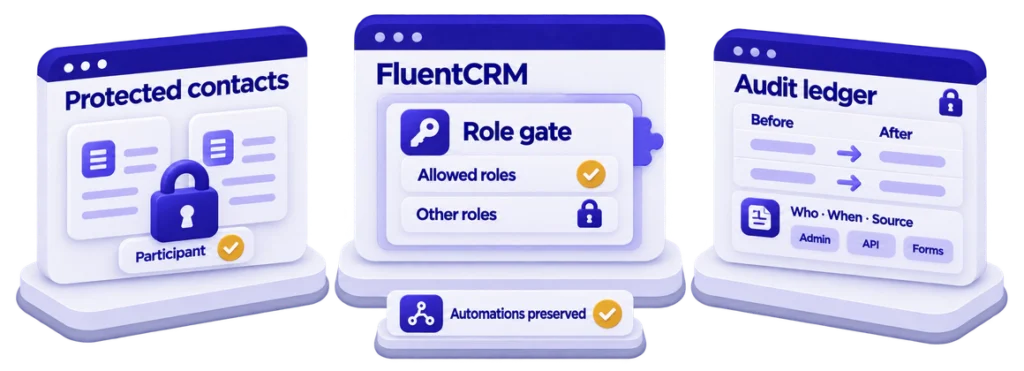
Every contact edit gets a who, what, when and from-where record, and protected contacts answer only to the roles the client chooses — both enforced before FluentCRM’s own controllers run, so the admin screen cannot be talked around.
3
entry paths audited
3
routes gated
2
protection layers
0
FluentCRM core edits




| Client | Dutch B2B services consultancy (anonymised) |
|---|---|
| Challenge | FluentCRM says a contact changed — not which field, from what value, or by whom. And contacts enrolled in the firm’s programmes had to be off-limits to everyone except senior staff, which per-capability permissions cannot express. |
| Delivery | A FluentCRM add-on: the field-level audit ledger, dashboard and per-contact history tab, the two-layer protected-tags system with bypass channels for automations, CSV export — plus contact migration, the role and 2FA policy, staged acceptance tests, go-live, training and handover. |
| Stack | WordPress, PHP, FluentCRM, Vue, MySQL |
| Timeline | November 2025 to February 2026, version 1.0.2 |
The challenge
The firm keeps every client and prospect in FluentCRM, and several staff under different WordPress roles edit those records daily — through the admin screen, through API integrations authenticated with application passwords, and through Fluent Forms submissions, all writing to the same contact. Two things were missing. Accountability: FluentCRM’s activity feed says a contact was updated, not which field, from what value, or by whom — so when a phone number turned out wrong, nobody could say who changed it or what it had been. And a lock: contacts carrying the firm’s participant tag had to be editable only by senior roles, which FluentCRM’s per-capability permissions cannot express.
The client needed a record of every field change — old value, new value, who, when, from where — across all three entry paths; tags that mark protected people, touchable only by chosen roles, bulk actions included; automations and form integrations that keep working, because a lock that blocks the CRM’s own workflows is worse than none; everything inside FluentCRM’s admin; and a ledger that cannot be edited. The contact base had also just been migrated in, so the ledger had to exist from day one rather than be retrofitted after the first dispute.
What made it hard: FluentCRM’s admin is a Vue single-page app talking to FluentCRM’s REST API, and the hook FluentCRM fires when a contact changes fires after the save — perfect for recording, useless for blocking. Enforcement had to happen at the REST boundary, before FluentCRM’s controller runs, with a refusal its UI could display. And roles were not what they seemed: FluentCRM’s CRM Manager is a flag on the user, not a WordPress role, while the site’s custom roles carried capabilities WordPress normally reserves for administrators. Any rule written in terms of capabilities would let the wrong people through.
What ScalarWP built
The ledger has one capture point: FluentCRM’s own contact-updated hook. Each firing writes one row per changed field — field, old value, new value, actor, source, IP, user agent, time — skipping internal bookkeeping fields so the ledger records what people did, not what the system did. Source is one of three values: admin screen, application-password API call, or Fluent Forms. The form path needed its own handling, because the same hook carries a different payload from forms — the feed’s field mapping rather than changed values — so the handler re-reads the saved contact, diffs custom fields against a pre-submission snapshot, and writes the form’s title as the actor: the ledger reads “changed by: Intake form”, not “changed by: System”. IP capture respects the site’s anonymise-IP setting, and the table carries six indexes because the two questions that matter are “what happened to this person” and “what happened this week”.
Inside FluentCRM’s admin: an audit dashboard with four tiles, eight filter dimensions plus debounced free-text search and nine date presets, a details dialog showing each change as old value to new value with actor and source, and CSV export with a UTF-8 byte-order mark so Excel opens Dutch names with their accents intact. Every contact profile gains a history tab — that contact’s ledger, newest first — so “what happened to this person” is answered without leaving the record. The ledger’s own API refuses to create or edit rows: an audit trail you can edit is not one.
Protection is two independent switches per tag. Restricted: only listed roles may add or remove the tag. Participant lock: contacts carrying it may only have their fields edited by listed roles — and a lock tag is always also restricted, because you cannot lock a person with a tag anyone could remove. Allowed roles are the site’s real WordPress roles plus “CRM Manager” as a pseudo-role resolved through FluentCRM’s own flag. The bypass rule learned its lesson from a real account: the first build waved through anyone with the manage_options capability, until a contributor with a custom role carrying that capability walked past the lock. The rule now tests for the literal administrator role — on a site with custom roles, capabilities describe what WordPress will let you do, not who you are.
Enforcement runs in one WordPress REST dispatch filter, ahead of FluentCRM’s controller and its permission callback: bypass channels first (a PHP constant, a filter, or an HTTP header — explicit, auditable passes for automations and integrations), then administrators, then three gated routes. The guard reads exactly what FluentCRM’s own controller reads — slugs on the tag-sync route, IDs on bulk actions, and only the single-contact route checks the contact itself, because it is the only one that edits fields. A refusal is a structured 403 naming the code and the roles that would have been allowed, which FluentCRM’s UI can show. Around the plugin: the contact migration, the WordPress role and 2FA policy, role-based acceptance tests with client staff on staging, go-live, training and handover — the client’s own administrators configure protected tags and roles today.
The outcome
- All three entry paths audited — admin screen, REST API, Fluent Forms — with three FluentCRM routes gated and zero edits to FluentCRM core.
- Two protection layers per tag, three explicit bypass channels for system actors, and structured 403s the CRM’s own UI displays.
- Fifteen REST endpoints of the add-on’s own, two of which refuse writes by design; two custom tables with re-runnable migrations.
- About 3,100 lines of PHP and 3,300 of Vue, JavaScript and CSS; zero PHP dependencies; version 1.0.2, November 2025 to February 2026.
- Owned and operated by the client since handover, on a contact base migrated in before the ledger’s first day.
What ScalarWP delivered
- The field-level audit ledger with actor, source, old and new values across all three entry paths.
- The audit dashboard, per-contact history tab, and BOM-correct CSV export.
- The two-layer protected-tags system with role resolution that survives custom roles and CRM Manager flags.
- The REST-boundary enforcement layer with explicit bypass channels and structured refusals.
- Contact migration, the role and 2FA policy, staged acceptance testing, go-live, training and handover.
Why it mattered
Accountability tools fail in one of two ways: they record too little to settle a dispute, or they block the daily work until someone switches them off. Splitting “who may use this tag” from “who may edit this person” kept routine tagging open while locking what mattered, the explicit bypass channels kept every automation running, and enforcing at the REST boundary meant the rule holds whether the edit comes from the screen, a script, or a form. When the next “who changed this?” arrives, the answer is one search — with the old value attached.
Need to know who changed what, and stop the wrong hands?
Audit trails, role gates and locks that hold at the API — built inside the CRM your team already uses, without blocking the work.