PLUGIN EXTENSIONS & CUSTOM FEATURES
Per-recipient signatures and CSV records inside FluentCRM emails
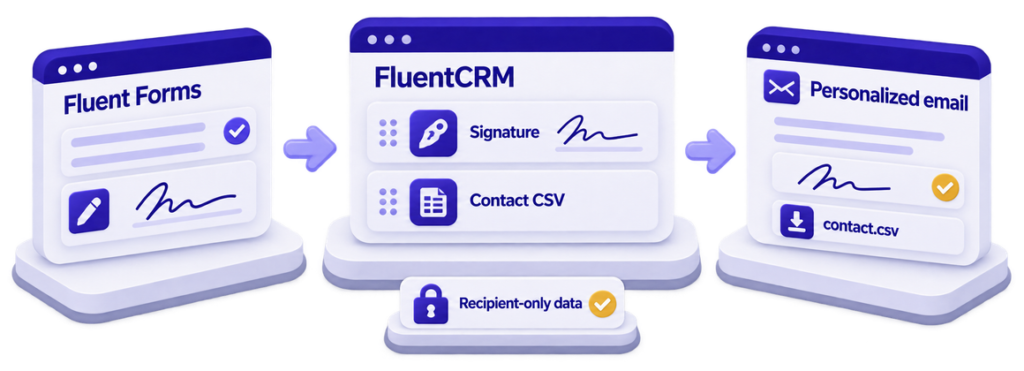
Two editor blocks that make a bulk email personal to the point of carrying the recipient’s own handwritten signature and a download of their own data, without a single new database table or public endpoint.
2
editor blocks
0
public endpoints
0
custom tables
9
Fluent hooks used





| Client | A business running FluentCRM and Fluent Forms on WordPress (anonymised) |
|---|---|
| Challenge | Show each recipient their own signature, captured in a Fluent Forms submission, plus a CSV of their own contact record — from FluentCRM’s normal email editor, with no leak between recipients. |
| Delivery | A WordPress plugin with a signature block and a contact-CSV block, the Fluent Forms setup that feeds them, the CRM automation around them, training and handover — plus a FluentCRM v3 compatibility update. |
| Stack | WordPress, PHP, FluentCRM, Fluent Forms, JavaScript |
| Timeline | First release January 2024; hardened through March 2024; FluentCRM v3 compatibility May 2026 |
The challenge
The client collected signed agreements through a Fluent Forms form with a signature field, and contacts landed in FluentCRM. The confirmation email that followed was generic: it could greet the person by name, but it could not show them what they had signed, and it could not hand them a copy of the data the business now held about them.
Each confirmation needed that recipient’s signature image from their own submission, a link downloading a CSV of that recipient’s contact record with the business choosing the columns, and both had to work from FluentCRM’s normal email editor — in campaigns and automations, with no per-email manual work, and no way for one recipient to see another’s signature or data.
FluentCRM’s editor saves a block once, at design time, when the recipient is unknown. Personalisation happens later, per recipient, in a different code path for campaigns than for automations. Anything that varies by person has to survive the save, survive FluentCRM’s own block rendering, and then be rewritten twice over — while the signature lives in Fluent Forms’ submission tables, keyed by submission, not by contact. Bridging those two identities safely was the whole job.
What ScalarWP built
ScalarWP built both features as drop-in blocks for FluentCRM’s own email editor. Each saves a small placeholder at design time and is rewritten per recipient at send time, using FluentCRM’s render pipeline and its email-body filters rather than any custom send logic — so nothing breaks when FluentCRM changes how it sends.
The signature block ships a form picker that lists only forms actually containing a signature field, sizing sliders and alignment. At submit time the plugin writes one compact record to the submission’s meta — email, form, submission, signature — so send-time lookup is a single indexed query, checked twice against the recipient’s email before a signature is ever returned. A recipient with no signature on file gets the image removed, not a broken tag.
The contact-CSV block presents FluentCRM’s full contact schema as grouped, reorderable checkboxes. The chosen column set is hashed; the hash is both the stored configuration key and the identifier in the download link. The link itself rides FluentCRM’s tracked webhook route — the same machinery as its unsubscribe links — so recipient identity comes from the CRM, not from a parameter anyone could tamper with. The CSV is streamed from a temp file and deleted.
Around the plugin: the agreement forms in Fluent Forms, the tag and custom-field structure, the automation that sends the signed confirmation, go-live, training and handover. When FluentCRM v3 moved its editor into an iframe in 2026, a compatibility release moved asset loading and block registration to the new hooks.
The outcome
- Two editor blocks, usable in campaigns and automations from the standard FluentCRM editor.
- Zero new public endpoints and zero custom tables — identity and delivery ride FluentCRM’s own machinery.
- Plugin v1.1.2: about 1,100 lines of PHP and 620 lines of block source across 16 commits, using 9 FluentCRM and Fluent Forms hooks.
- If FluentCRM is missing, the plugin shows an install/activate notice and deactivates itself — a missing dependency cannot produce a fatal.
- The client’s team places and configures both blocks themselves; they own the plugin today.
What ScalarWP delivered
- A signature block with form picker, sizing and alignment — showing each recipient their own signature.
- A contact-CSV block with column selection and ordering, delivered through FluentCRM’s tracked-link route.
- The Fluent Forms agreement forms, CRM tag and field structure, and the confirmation automation.
- A dependency guard, go-live, team training and handover.
- The FluentCRM v3 iframe-editor compatibility update.
Why it mattered
Personalisation this deep usually means a parallel sending system that has to be secured and maintained. By borrowing the host’s identity instead of re-deriving it, saving placeholders and substituting at send time, and writing the lookup key when the data is created, the client got signed confirmations from the CRM they already used — and when the host moved under it, the fix stayed inside registration and enqueueing.
Need a feature your plugin does not include?
Tell us the workflow your stack cannot finish. We will scope the smallest plugin-native layer that closes the gap — and you own it when we leave.